

Is It OK to Sit and Work on a Rollator Walker?
Jul 14, 2025
If you're using a rollator walker and wondering whether you can sit on it and get some work done—maybe answer emails, jot notes, or even crochet—you’re not alone. With so many folks multitasking these days, it’s natural to want your mobility aid to pull double duty. But is that really safe or comfortable?
Rollator Walkers Have Seats for a Reason
Yep, that seat isn't just for show. Most rollator walkers come with a built-in seat, and it’s super handy when you need to take a breather while walking or standing for long periods. Whether you're waiting in line, catching your breath during a walk, or just need to sit for a moment, that seat is a lifesaver.
But here’s the catch: that seat was designed for short-term resting—not for hours of work like a regular office chair.

Is It Safe to Sit on a Rollator to Work?
Short answer? Sometimes. But with caution.
If you’re just doing something quick—like jotting down a note, checking your phone, or paying a bill online—then sure, it can work for a few minutes. Most rollators, especially the ones with seats and backrests, offer enough support for brief tasks.
But sitting and working for extended periods? That’s another story.
Here’s why:
(1) Seat size: The seat on a rollator walker is typically narrow and may not be padded enough for long sitting sessions. It’s not exactly built for comfort.
(2) Posture problems: These seats don’t offer lumbar support, and there’s usually no adjustable height. That means you’re likely sitting too low for your desk or hunched over your laptop. That can lead to back, neck or shoulder strain.

Elenker HFK-9236T4 upright walker with adjustable seat height
(3) Stability risk: Rollators have wheels. Even with brakes, some rollators might shift if your weight isn’t balanced. That could lead to tipping, especially if you lean forward too far.
Can I Use It Like an Office Chair?
Think of it more like a "rest stop" seat rather than a full-time workstation. It’s okay for light, short-term tasks, but not ideal for sitting and working all day.
If you absolutely need to use your rollator as a seat while working, here are some tips to make it safer and comfier:
Tips for Working While Sitting on a Rollator Walker
Lock the Brakes
First and most important: always lock the brakes. Don’t rely on just the friction of the wheels against the floor. Even a slight movement can be risky if you’re leaning forward or reaching for something.
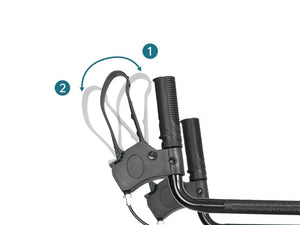
Dual Brakes: (1) squeeze to slow down and (2) press down to lock the wheels
2. Add Some Padding
You can place a cushion or folded towel on the seat for better comfort. Your bottom will thank you, especially if the original seat is thin or hard plastic.
3. Use a Stable Surface
Avoid sitting on the rollator and using a wobbly table. Make sure your workspace is steady and the height isn’t forcing you to hunch.
4. Don’t Skip the Backrest
If your rollator walker has a backrest, great. Sit with your back supported. If it doesn’t, try not to lean too far back or forward. It’s easy to lose your balance without proper support.
5. Limit Your Time
Set a timer if you need to. Even 15–20 minutes can start to feel uncomfortable if you’re sitting on a small seat without much padding or support.
When It Might Work Just Fine
Let’s say you’re:
(1) Working on a puzzle at the kitchen table
(2) Checking your grocery list
(3) Doing a short phone call or video chat
(4) Writing a birthday card
For these lighter, low-risk activities, sitting on a rollator seat can work just fine. As long as you’re mindful of posture and stability, you’re good to go.
When It’s Better to Switch Seats
If you’re planning on doing something longer—like a couple hours of computer work, reading, knitting, or any job that requires both hands and concentration—it’s probably time to move to a proper chair.
Use a regular chair with good back support, a cushion if needed, and one that’s the right height for your table or desk. Your body will thank you, and so will your productivity.

Elenker HFK-9240 upright walker with sit to stand handles
Who Might Need to Be Extra Careful?
Some people should take extra caution before using a rollator seat for anything other than resting:
(1) Folks with balance issues: If you feel unsteady even while seated, a rollator might not be the safest spot.
(2) People recovering from surgery: Especially if you’re under movement restrictions or need firm support.
(3) Those with joint pain: A hard, narrow seat can aggravate hip or knee pain over time.
If you’re unsure, it’s always a good idea to ask your physical therapist or doctor.
Using a rollator walker seat for quick tasks here and there? Totally fine—just be safe, lock those brakes, and don’t expect it to feel like your favorite office chair. But if you're thinking about working for hours on end while sitting on it... probably best to find a proper chair.
Your rollator is there to help you move and rest. If it helps with a little light work on the side, great. Just don’t push it beyond what it was built for.


