

Will a Rollator Walker Fit Under a Standard Desk?
Jul 14, 2025
Thinking about bringing your rollator walker into the office or using it in your home workspace? You’re probably wondering one important thing: will a rollator walker even fit under a standard desk?
What’s a “Standard Desk” Size?
Most standard desks are about 29 to 30 inches high. That gives enough room for your legs, a chair and maybe a bit of wiggle space. Desks vary a bit, of course—some have drawers underneath, some are minimal and open—but that 29-30 inch height is pretty common across the board.
Will a Rollator Walker Fit Under There?
Sometimes yes, sometimes no. It depends on a few key things:
(1) The height of your rollator seat
(2) Whether it has a backrest that sticks out
(3) If the handlebars tilt forward or stick up
(4) How deep the desk is underneath
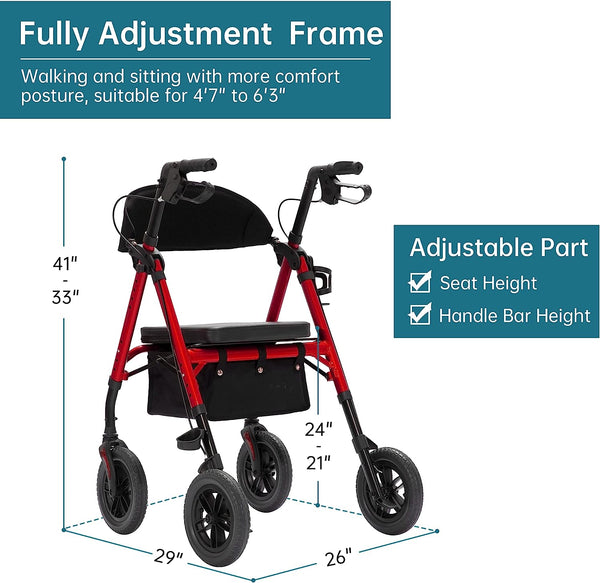
Elenker KLD-9218-10 rollator walker with adjustable seat height and adjustable handle bar height
Rollator Seat Height vs. Desk Height
Most rollator walkers have seats that sit between 18 and 24 inches from the ground. So far, so good, right? But it’s not just about the seat. You also have to account for:
(1) The backrest, which can add another inch or two
(2) The handlebars, which might rise above seat height
(3) Any storage pouches or baskets under the seat

If your rollator is around 22"–24" high at the seat and the handlebars are adjustable, you’ve got a decent chance it’ll slide under the desk. But if the handles are tall or fixed in place, they might block you from pulling all the way in.
Handlebar Trouble - The Unexpected Blocker
Here’s a fun surprise a lot of people run into—the handlebars get in the way.
Some rollators have handlebars that lean forward. Others stick straight up or even angle back slightly toward the seat. If they’re fixed in a high position, you might not be able to scoot close enough to your desk.
But here’s the good news: many rollator walkers have adjustable handles. Lowering them a notch or two could make all the difference when it comes to fitting under your desk comfortably.

Elenker HFK-9236T4 upright walker with adjustable seat height, handle bar height and handgrip length and angle
The Backrest - Friend or Foe?
The backrest on your rollator seat might feel like a little thing, but it can cause issues if you’re trying to sit close to a desk. Some backrests are just simple straps, while others are thick, padded and stick out quite a bit.
If your desk has a lot of space underneath, it might not matter. But in tighter setups, the backrest can keep you from getting close enough to type, write or do your thing comfortably.
Some folks solve this by flipping the rollator around and sitting on it backwards—with the backrest in front. It’s not how the rollator is “supposed” to be used, but it works in a pinch.
Desks with Drawers Bing More Problems
If your desk has drawers or a built-in shelf under the tabletop, your rollator walker may have a hard time fitting underneath—even if the height is technically okay.
Drawers reduce the depth and leg space under the desk, which makes it harder to slide your rollator close enough. You might be able to sit in front of the desk, but your knees or the handlebars could bump into stuff.

So if you're using a rollator regularly at your desk, try to pick a desk with a clear, open space underneath—no drawers, no clutter, no problems.
Working from Home? You’ve Got More Flexibility
If you're working from home, you’re in luck. You’ve got the freedom to choose a desk setup that actually works with your rollator. That could mean:
(1) Swapping your old desk for a height-adjustable one
(2) Choosing a wide, open-leg desk
(3) Using a tabletop on adjustable legs for custom height
You can even test your rollator with different chairs or dining tables to see what setup feels best for your body.
Folding and Parking When Not in Use
Here’s something else to consider: do you need to sit in the rollator all day, or just use it to get around?
If you only use the rollator for movement but prefer sitting in a standard office chair, make sure your rollator folds up easily. A compact fold-up rollator can be stored:
(1) Under the desk (if there’s enough space)
(2) Behind your chair
(3) In a corner or closet nearby
Just don’t block emergency exits or your coworkers’ walking paths. Nobody likes a workplace obstacle course.

Best Rollator Features for Desk Use
If you’re shopping for a rollator with desk use in mind, here are some features that really help:
(1) Slim frame: Easier to fit between chair legs and under tables
(2) Adjustable handlebars: So you can lower them when needed
(3) Minimal backrest: Avoids unnecessary bulk
(4) Quiet wheels: No clunky sounds while rolling around the office
(5) No protruding accessories: Keep baskets and bags neat and out of the way
There are even rollators made specifically for indoor use—lightweight, narrow, and designed for tight spaces like home offices.

Elenker YF-9006B all-terrain portable 3 wheel rollator walker
So a rollator walker might fit under a standard desk but not always. The fit depends on the rollator's size, the desk’s design and how you plan to use it.
If you're using a rollator full-time at your desk, look for models with a compact frame and adjustable handles. If you're using it for walking only and prefer a regular office chair for sitting, make sure the rollator folds easily and stores neatly nearby.
It’s about comfort, practicality and making your space work for you - not the other way around.


